Blackberry Storm 2 9550 Take Apart LCD + Touch Screen Repair Guide
June 4, 2018 | 0 Comments
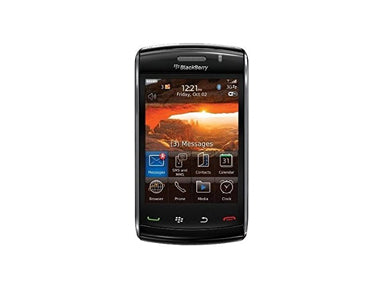
This video guide shows how to take apart and disassemble the Blackberry Storm 2 9550 & 9520 cell phones. This shows the method used to quickly and safely open your phone so you can install a replacement LCD screen and glass touch screen digitizer. This guide has been designed and put together by the Repairs Universe team.
This guide will help you to install the following Blackberry Storm 9550 / 9520 replacement parts:
- Blackberry Storm 2 9550 LCD + Glass Touch Screen Digitizer
- Other Blackberry Storm 2 9550 Replacement Parts
Tools Required:
Blackberry Storm 2 9550 LCD & Touch Screen Digitizer Replacement Guide:
In addition to the above video you will need to remove the metal backing plate from your old LCD screen and attach it to your new replacement before installation. This metal backing plate has clips which help hold the screen in place and also help with the touch screen functionality. The metal backing plate is just held to the old LCD screen assembly with clips and a small bit of adhesive. Simply release these clips using a safe open pry tool and then pry the metal backing plate off. Attach to the new LCD screen replacement before installation.
Blackberry Storm 2 9550 LCD & Touch Screen Digitizer Replacement Summary:
Using this summary in correlation with the video will insure proper instructions are given and a safe repair is made.
- Remove the battery and the sim card from the phone. Using the safe pry tool, lift off the camera lens cover.
- Turn the phone over and using the safe pry tool do the same on the bottom section of the phone right underneath the keys. Use a T6 Torx to remove the two screws that underneath the cap you?ve just removed
- Turn the phone over and remove the four T6 Torx screws. Once the screws have been removed, use the safe prying tool and run along from the front and back cover of the phone released in the clips. There are three clips on each side.
- Once all of the clips have been released you now remove the top cover of the phone. Just be careful as it is still connected to the antenna cable which is just a small cap connection.
- The antenna cable is connected to the top left part of the phone. Turn the phone over and remove the back cover, easily pull it away. Next using a safe pry tool lift the pop ribbon connector that is the connector for the LCD screen.
- You can now remove the LCD screen and replace it.
Notice:
Repairs Universe's guides are for informational purposes only. Please click here for details.
Learn about restrictions on reproduction and re-use of Repairs Universe's repair/take-apart/installation guides, and about creating hyperlinks to our guides.